
Seat-Based Billing
What counts as a seat, how the seat count is changed, and why the Stripe portal is locked down.
With seat-based billing, an organization's subscription is priced per person.
The subscription row carries a seats quantity, the members of the
organization consume it, and the database refuses to let usage exceed
capacity. This page covers what consumes a seat, how the quantity is changed,
and the Stripe configuration that keeps the app and Stripe in agreement.
Seat billing is Stripe only. A RevenueCat or App Store subscription has no
server-adjustable quantity, so anything not Stripe-backed is refused with
NOT_STRIPE_SUBSCRIPTION.
Seat-based billing only
This section applies only to projects generated with `--seat-based-billing`.
Requires ENABLE_SEAT_BASED_BILLING
Seat-based billing is off in a new project. Set `ENABLE_SEAT_BASED_BILLING=true` in both `.env.local` and `supabase/.env.local` to use this section.
A layer on top of two other layers
Everything on this page exists only in projects generated with seat-based
billing, which itself requires multi-tenancy and Stripe. The backend's env
validator enforces the chain: ENABLE_SEAT_BASED_BILLING is rejected unless
ENABLE_MULTI_TENANCY and ENABLE_STRIPE are also true.
What counts as a seat
A used seat is an active member holding a seat-consuming role. That is the
whole definition: the usage counter counts distinct users whose membership is
active and whose role has counts_toward_seat = true.
| Person | Consumes a seat? |
|---|---|
| Active member, any of the three seeded roles | Yes, the owner included |
| Deactivated member | No |
| Pending invitation | No |
| Member holding only a non-seat role you added | No |
Two consequences fall out of that table:
- Deactivating a member frees their seat immediately. It is the supported way to stay under quota without removing someone; their role and history are kept, and reactivating them re-runs the seat check. See Members & Invites.
- Invitations do not reserve seats. Several invitations can be issued
against one free seat, and acceptance is first come, first served: the seat
check runs again at acceptance, so a late accepter is refused
with
SEATS_LIMIT_REACHEDeven though their invite went out fine.
Sending the invitation is gated too, but the checks run in a deliberate
order. An email that already has a pending invitation is refused with
ACTIVE_INVITATION before the seat check, because re-inviting someone
consumes no new seat; a full organization must not be the reason a duplicate
invite sends an admin off to buy a seat for a person who already has one.
No subscription means no new members at all
The seat check looks for an active or trialing subscription first and
raises NO_ACTIVE_SUBSCRIPTION if there is none. It is not "unlimited until
you subscribe"; an organization without a live subscription cannot invite or
reactivate anyone.
A free role is one column away
All three seeded roles consume seats because roles.counts_toward_seat
defaults to true and the seed never overrides it. The column exists so you
can add roles that do not, and the migration documents the pattern itself:
Seat-based billing only
This section applies only to projects generated with `--seat-based-billing`.
-- ? Pattern for non-seat-consuming roles:
-- ? When creating a role that should not consume seats (e.g., "guest", "viewer", "external"):
-- ? INSERT INTO public.roles (slug, name, description, counts_toward_seat)
-- ? VALUES ('guest', 'Guest', 'Guest user with limited access', false);
Holders of such a role are invisible to the seat counter and skip the seat
check entirely, at invitation and at reactivation. Flipping an existing
role's counts_toward_seat to true is guarded the other way around: the
change is refused with SEATS_LIMIT_REACHED if it would push any organization
over its quota.
For a role that already exists, seeded or yours, the flip is one statement:
UPDATE public.roles
SET counts_toward_seat = false
WHERE slug = 'admin';
A statement-level trigger, trg_sync_seats_used_on_role_change in
supabase/migrations/*_seat_based_billing.sql, resyncs every
organization's seats_used in the same transaction, so freed or newly
consumed seats are correct the moment the flip commits; the flip back to
true is the guarded direction described above. Before your first deploy you
can carry the same choice in supabase/db_seeds/permissions_and_roles.sql
instead, by adding the counts_toward_seat column to the role's INSERT.
Changing the seat count
Seat changes live in Billing, behind the billing permission, so the owner and admins can make them and a plain member never sees the control; who holds which permission is on Authorization.
Pick a number. The stepper in the manage-seats sheet is bounded to
[current usage, 999]; you cannot even request fewer seats than are in use.
The server enforces the same bounds (INVALID_SEATS, SEATS_BELOW_USAGE), so
freeing seats always means deactivating or removing members first.
Read the preview. As the number changes, the app asks Stripe for a priced preview and shows the exact money line before anything is committed. An increase is charged immediately; a decrease becomes a credit on the next invoice. The preview and the commit use the same proration rule, so the number you are shown is the number you get.
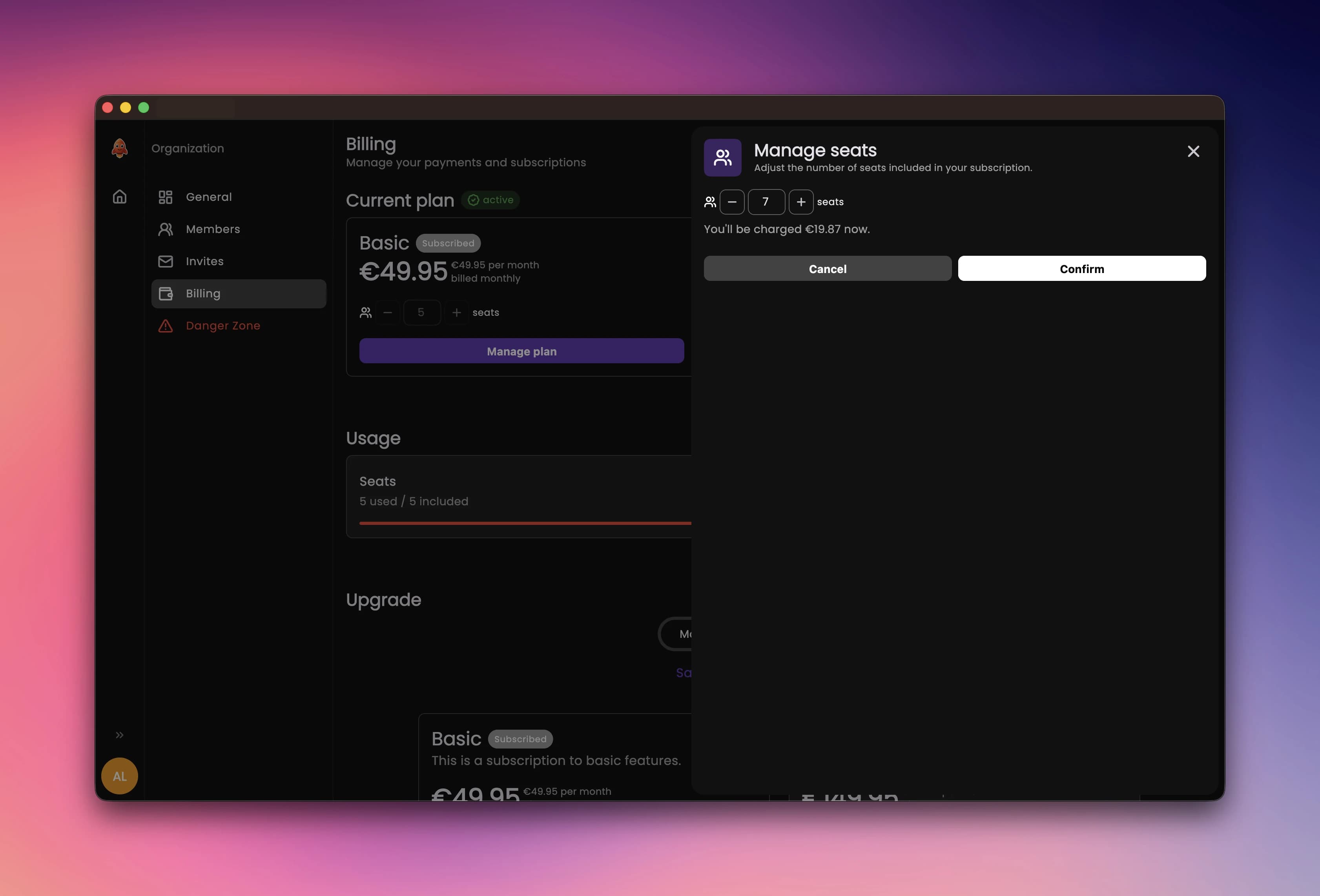
Confirm. The change is applied to the Stripe subscription in a mode where
a declined card fails the request on the spot, with Stripe's own decline
message, instead of quietly parking the subscription in past_due.
One invariant makes the whole flow safe to reason about: the Stripe webhook
writes the database; the app never does. The seat-change function updates
the subscription at Stripe and stops; subscriptions.seats only changes when
the customer.subscription.updated event comes back, so the database always
reflects what Stripe actually accepted. A hard CHECK constraint
(seats_used <= seats) backstops the usage counter.
What members can see
Billing data has two audiences. The full subscription record is readable only by holders of the billing permission; members read a deliberately limited public view that carries the plan, status, period dates and trial dates, and nothing else: no seat counts, no price, no cancellation state.
| Member | Owner / admin | |
|---|---|---|
| Plan, status, renewal date | Yes | Yes |
| Seats, seats used, price | No | Yes |
| Manage seats, cancel | No | Yes |
When an organization's subscription lapses, a member cannot fix it; they are routed to the access hub with a "contact your administrator" notice, while the owner and admins keep access to billing to recover the subscription. The hub itself is covered on Organizations.
Why the Stripe portal is restricted
The app is not the only surface that can edit a subscription; Stripe's hosted
billing portal can too, and by default it honors whatever the account's
default portal configuration allows. If that configuration includes
quantity in its allowed subscription updates, any customer with portal
access can edit their own seat count, bypassing the billing permission,
SEATS_BELOW_USAGE, and every other guard above.
The project closes the gap with two dedicated portal configurations:
- Restricted, with
quantityremoved: used for every customer-facing portal session, so seats are editable only in the app. - Confirm, with
quantitypresent: used only for the app's own server-driven plan-change flow, which Stripe validates against the same allowed-updates list even though the server picks the quantity.
Both are provisioned once per Stripe account by scripts that are already part of setup. The setup steps live on Stripe and in Useful Commands; this page only explains what they protect.
Turning it on
Requires ENABLE_SEAT_BASED_BILLING
Seat-based billing is off in a new project. Set `ENABLE_SEAT_BASED_BILLING=true` in both `.env.local` and `supabase/.env.local` to use this section.
The flag lives in both environment files, and the backend additionally needs the confirm portal configuration provisioned by the script above:
ENABLE_SEAT_BASED_BILLING=trueENABLE_SEAT_BASED_BILLING=true
STRIPE_PORTAL_CONFIRM_CONFIGURATION_ID=bpc_...The env validator ties the flags together: seat billing without
ENABLE_MULTI_TENANCY and ENABLE_STRIPE refuses to boot, and the error
names the missing flag. The full env matrix, and the boot failures a wrong
combination produces, are on
Troubleshooting.